

Menu

  • Home
  • Dashboard
  • Surveys & Offers
  • Tasks
  • Spin Wheel
  • Advertise
  • Affiliate
  • Withdraw
  • Support

Follow Us

SinhMMO – Make Money with Surveys, Tasks & Offerwalls
  • Store
  • Cart
  • Help
    • About Us
    • FAQ
    • Payout & Rewards Policy
    • Privacy Policy
    • Terms of Service
  • Blog
    • Guides
    • Advertising
    • Level & Bonus System
  • en English
    • en English
    • vi Vietnamese
No Result
View All Result
Subscribe
🔓 Login 👤 Register
SinhMMO – Make Money with Surveys, Tasks & Offerwalls
No Result
View All Result
Home Idle Earning
$1000 Month Passive Income with EarnApp

Maximize EarnApp Profits with Smart Tools

Boost your passive income with simple tools and smart automation strategies

Donate
0
0
SHARES

Hey guys, today I’m going to show you how to maximize your EarnApp income by optimizing your setup for passive earnings.

If you’re new and don’t know what EarnApp is, check out my full review here:
👉 Earnapp

EarnApp is a simple passive income app that pays you for sharing your unused internet bandwidth. Just install it, keep it running in the background, and start earning automatically.

Inside the guide, I’ll also walk you through how to sign up and set everything up step by step so you can start making money right away.

Before we start optimizing EarnApp, you’ll need to set up a few essential tools: VMware, Win iso, Proxifier, and residential proxies.

Table of Contents Hide
1 1. Install VMware
2 2. Install Proxifier
3 3. Creating a virtual machine in VMware
4 4. Maximize EarnApp Profits with Smart Tools

1. Install VMware

First, download VMware using the link below:
👉 Download VMware
VMware 17

After downloading, simply follow the installation guide below to set it up correctly.

ADVERTISEMENT

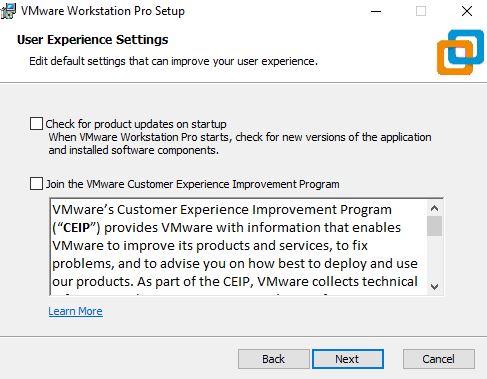
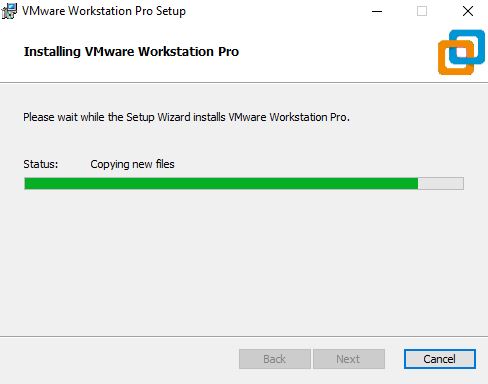
After downloading, extract the file and launch the installer. Then follow the setup steps and click “Next” until the installation is complete.

Step 1
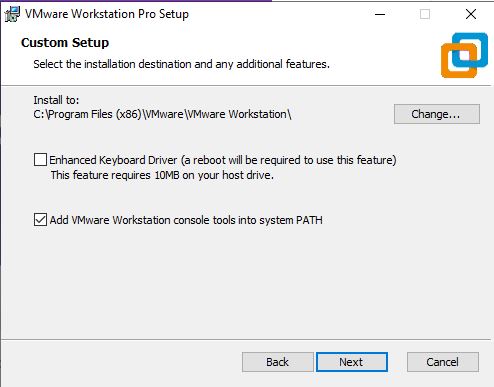
Install vmware1


Step 2

Install vmware2

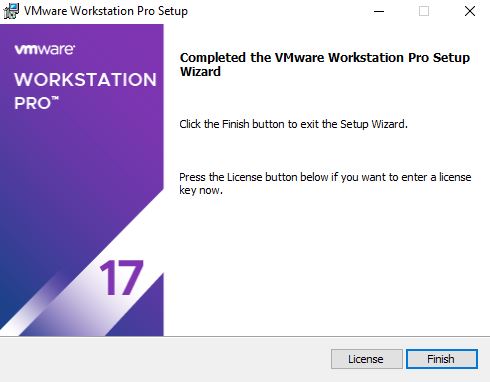
Step 3

Install vmware3

Step 4

Install vmware4

Once the installation is complete, open the “License” section and enter the license key included in the file you downloaded earlier.

Then click “Finish” to complete the setup.
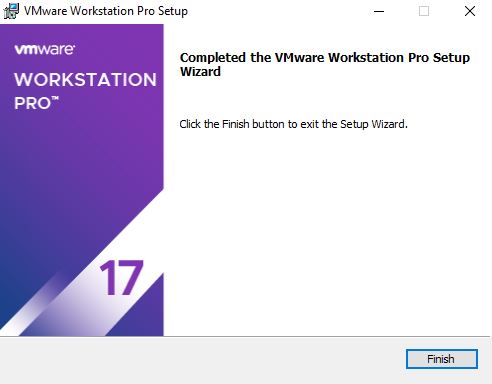
Install vmware5

2. Install Proxifier

Now, download Proxifier and install it on your computer. Download Proxifier
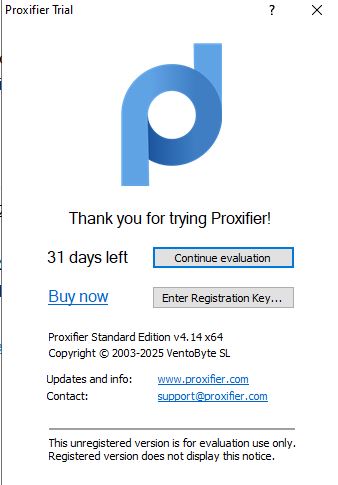
Install proxifier1

After installing Proxifier, open the app and click on “Enter Registration.” Then paste the license key to activate and start using the software.

You can get the Proxifier key here:
👉 Key Proxifier
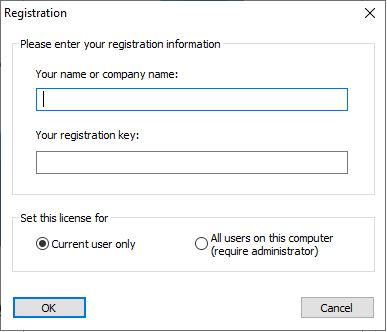
Install proxifier2

3. Creating a virtual machine in VMware

Alright, now that all the necessary tools are installed, let’s move on to the next step—creating a virtual machine in VMware.

Step 1
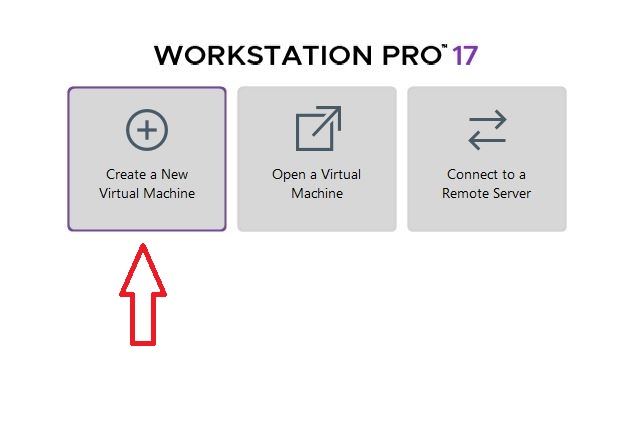
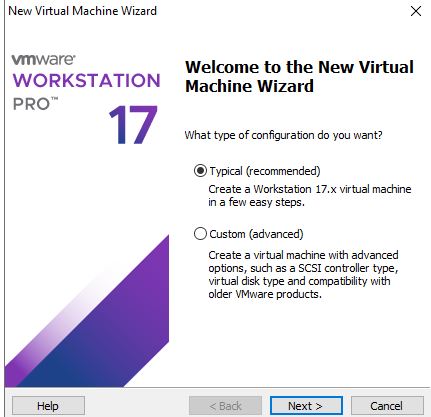
Start by opening VMware, then click on “Create a New Virtual Machine” to begin setting up your virtual machine.

Start by opening VMware, then click on “Create a New Virtual Machine” to begin setting up your virtual machine.

Step 2

Creat virtual machine1

Click Next

Creat virtual machine2

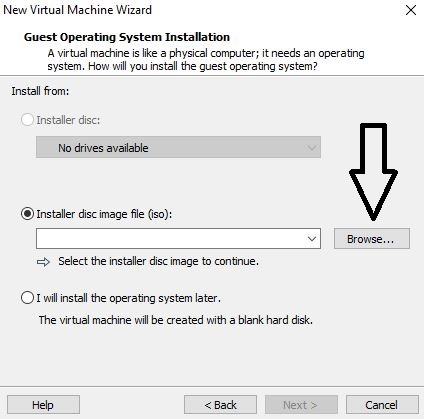
Next, click “Browse” and locate the Windows ISO file on your computer. Select the file to continue the setup process.

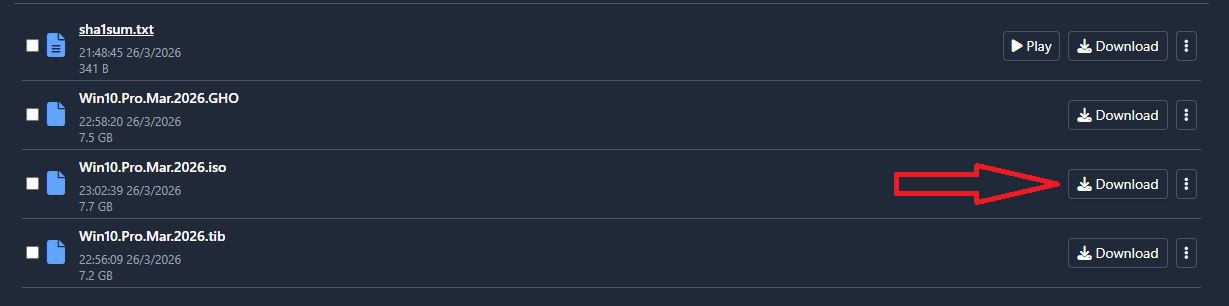
If you haven’t downloaded it yet, get the Windows ISO here:
👉 Download Win iso

Win10 iso

Step 3

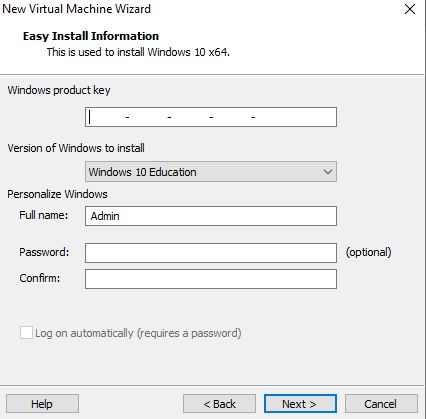
Once the Windows ISO is downloaded, the next step is to install Windows on your virtual machine and complete the setup.

Creat virtual machine3

Click next

Creat virtual machine4

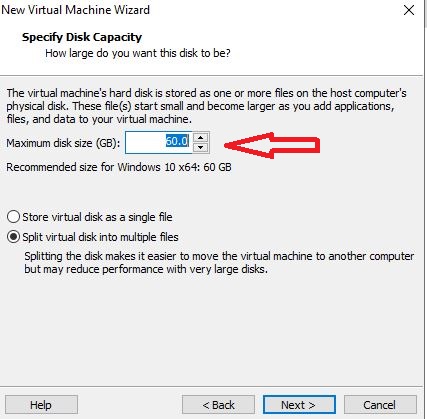
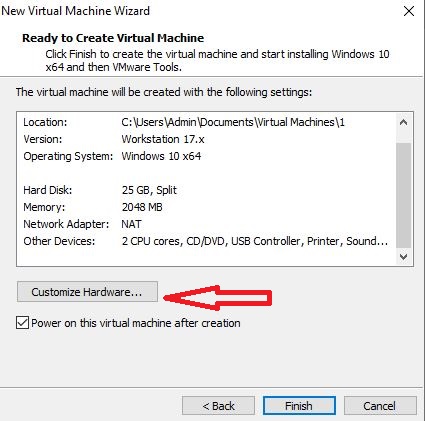
Here, you’ll need to allocate disk space for your virtual machine. For EarnApp usage, 20–25 GB is more than enough to run smoothly.

After that, click “Next,” then choose “Customize Hardware” to adjust your virtual machine settings.

Creat virtual machine5

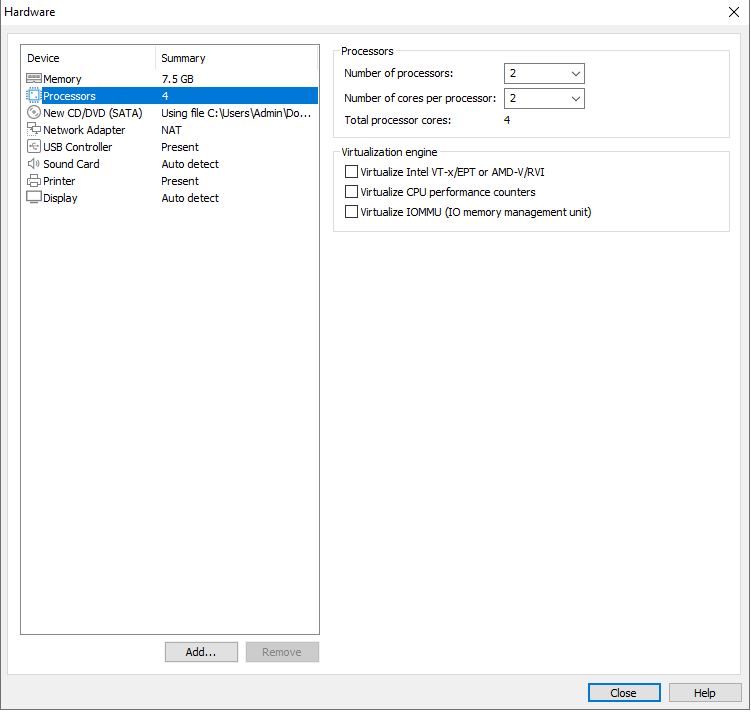
Now, adjust the hardware settings to match the configuration shown in the image below for optimal performance.

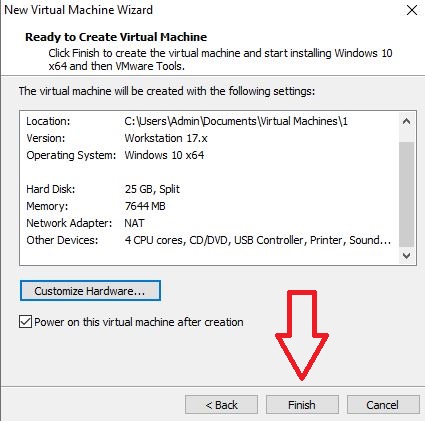
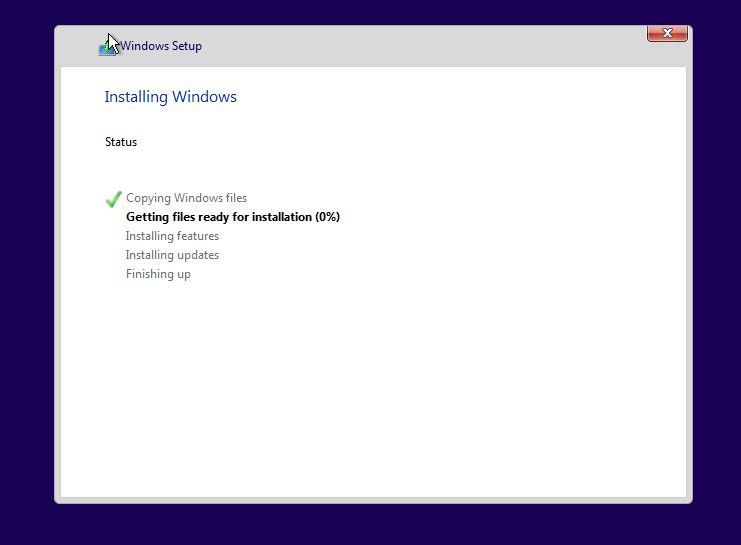
Once everything is set, click “Finish” and continue installing Windows on the virtual machine just like you would on a normal computer.

Creat virtual machine8

4. Maximize EarnApp Profits with Smart Tools

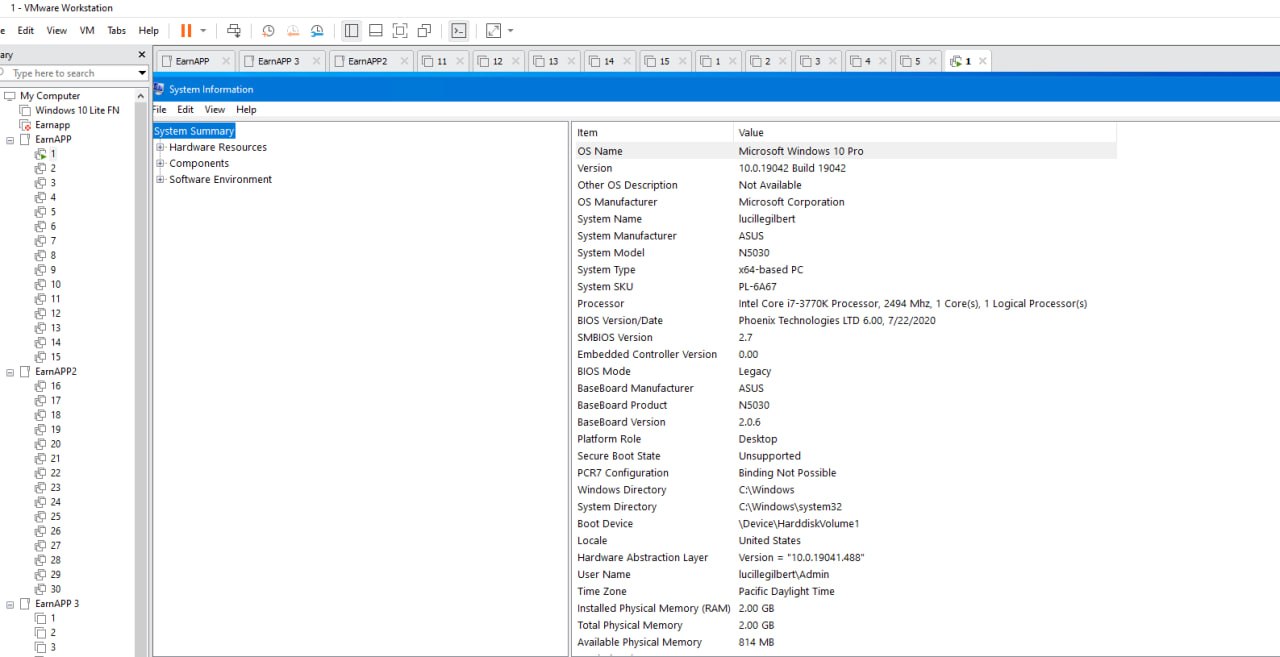
Earnapp vmware

Once Windows is fully installed, it’s time to start running EarnApp. For this part, please watch the video below for a step-by-step walkthrough.

If you run into any issues, don’t hesitate to leave a comment on this article or join our Telegram group for support:
👉 Group Telegram

0
SHARES
Disclaimer: This article is for informational purposes only and does not constitute financial advice. Always conduct your own research before making any financial decisions. Past results mentioned in this article do not guarantee future outcomes.

Stay ahead with trusted online income insights — follow us for proven strategies that work.

Learn to earn more, save smarter & live freer

Get weekly MMO tips, tools & opportunities — straight to your inbox.

Join 140,000+ smart earners. Privacy-friendly. Unsubscribe anytime.

0 0 votes
Article Rating
Subscribe
Login
Notify of
Please login to comment
0 Comments
Oldest
Newest Most Voted
Inline Feedbacks
View all comments
SinhMMO - Trusted Guide to Making Money Online

Join 10,000 + readers making money online!

LEARN HOW TO MAKE MONEY ONLINE THE SMART & EFFECTIVE WAY

📩 No spam – important updates only, sent 1–2 times per week. Unsubscribe anytime

  • Privacy Policy
  • Terms of Service
  • Cookie Policy
  • FAQ
  • Make Money Online
  • Earn Passive Income
  • Affiliate Marketing
  • Money Making Apps
  • Disclaimer
  • About Us
  • Contact Us
  • Sitemap
Disclaimer: All content on SinhMMO.com is for informational purposes only and does not constitute financial or investment advice. Users are solely responsible for their decisions. Please read our full Disclaimer.

© 2025 Sinh MMO – All rights reserved.

Welcome Back!

Login to your account below

Forgotten Password? Sign Up

Create New Account!

Fill the forms below to register

All fields are required. Log In

Retrieve your password

Please enter your username or email address to reset your password.

Log In

Add New Playlist

Loading...
Feedback
✖

🗣 Feedback Community

🔒 Please login to send feedback.

Fres +2680 point
Blessed
Aminah Nana +428 point
Sotus web ini bagus aku dapat rekomemdasi
Khải Quốc +481 point
nó rất tốt
Phương Lương +424 point
A web good
md sifat +425 point
Si F AT
See more...
Manage Consent

We use cookies to optimize your experience. You can accept or decline

Functional Always active
The technical storage or access is strictly necessary for the legitimate purpose of enabling the use of a specific service explicitly requested by the subscriber or user, or for the sole purpose of carrying out the transmission of a communication over an electronic communications network.
Preferences
The technical storage or access is necessary for the legitimate purpose of storing preferences that are not requested by the subscriber or user.
Statistics
The technical storage or access that is used exclusively for statistical purposes. The technical storage or access that is used exclusively for anonymous statistical purposes. Without a subpoena, voluntary compliance on the part of your Internet Service Provider, or additional records from a third party, information stored or retrieved for this purpose alone cannot usually be used to identify you.
Marketing
The technical storage or access is required to create user profiles to send advertising, or to track the user on a website or across several websites for similar marketing purposes.
  • Manage options
  • Manage services
  • Manage {vendor_count} vendors
  • Read more about these purposes
More
  • {title}
  • {title}
  • {title}
No Result
View All Result
  • 🔓 Login 👤 Register
  • Home
  • Dashboard
  • Surveys & Offers
  • Tasks
  • Spin Wheel
  • Advertise
  • Affiliate
  • Withdraw
  • Support
  • Store
  • en English vi Vietnamese

© 2025 SINHMMO - Earn money from surveys & Offers Walls SINHMMO.

wpDiscuz

Your Membership Levels

Learn to earn more, save smarter & live freer

Get weekly MMO tips, tools & opportunities — straight to your inbox.

Join 140,000+ smart earners. Privacy-friendly. Unsubscribe anytime.

Insert/edit link

Enter the destination URL

Or link to existing content

    No search term specified. Showing recent items. Search or use up and down arrow keys to select an item.